Quick answer: Open Pinterest Trends, choose the region you want to reach, and review Search trends. Use the weekly, monthly, and yearly movement to spot momentum, then open promising terms to check their curve, seasonality, related trends, demographics, and popular Pins where those features are available. Do not treat the biggest percentage as an automatic content idea. A useful keyword must also fit your audience, your timing, and the page your Pin will lead to.
The goal is not to collect a giant list. It is to find one search direction worth acting on before you design the Pin.
If you want the broader system behind that decision, start with how Pinterest search works. It explains how search intent, Pin context, boards, and destination pages work together.
Where to Find Trending Keywords on Pinterest
Pinterest's official Trends experience is the cleanest starting point because it uses activity from Pinterest itself. The public overview shows current trend modules and a region selector. A Pinterest business account unlocks deeper advertiser and audience-specific features where they are available.
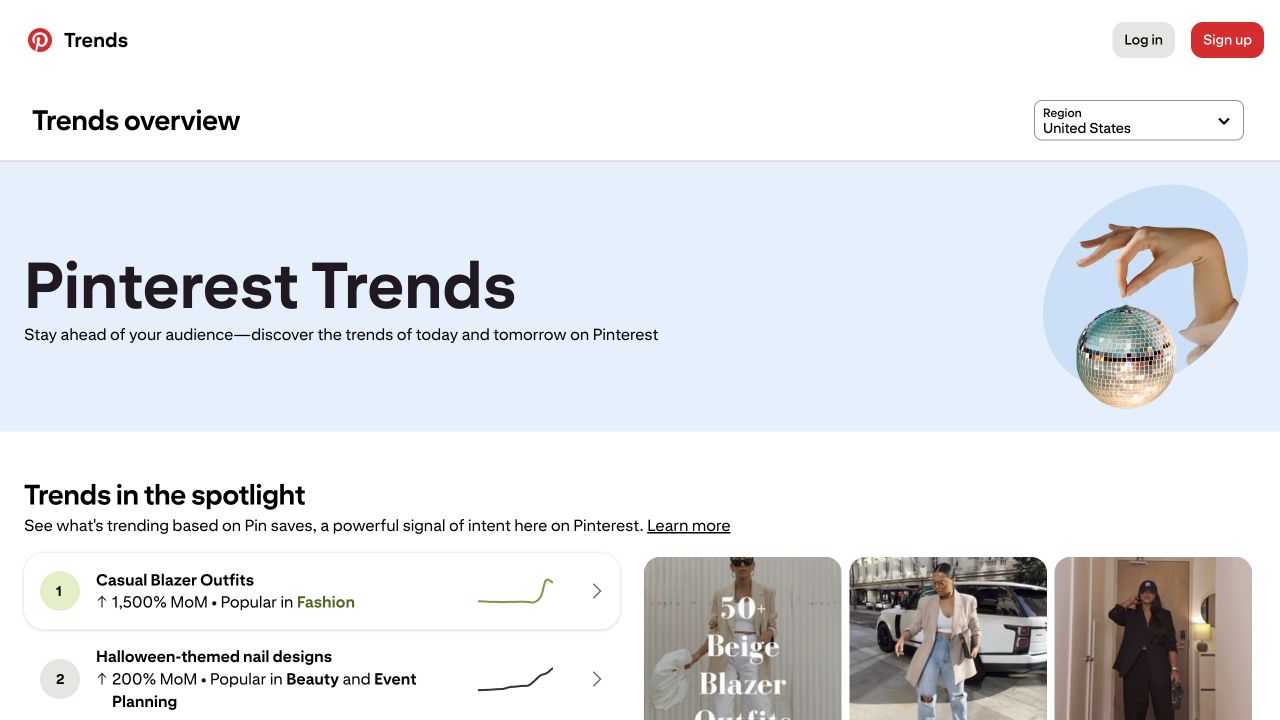
Start here:
- Open Pinterest Trends: Go to trends.pinterest.com.
- Choose the target region: The same phrase can move differently across countries, so choose the market your content is meant to serve.
- Open Search trends: Review the keyword table, then open a term to see more detail.
- Set the date range: Use a window that reveals whether the movement is new, seasonal, or part of a longer pattern.
- Compare related terms: Pinterest currently allows up to four keywords on one graph.
Pinterest says Trends can show up to two years of historical search, save, and shopping movement across supported regions. Some controls are still limited to certain markets, and audience-specific trends may not appear until an account has enough engaged-user data.
What the Pinterest Trends Screen Is Actually Showing
The overview combines several kinds of evidence. They are related, but they do not answer the same question.
| Trends area | What it reflects | Best question to ask |
|---|---|---|
| Trends in the spotlight | Momentum based on Pin saves | What ideas are people actively keeping? |
| Search trends | Keywords people are using in Pinterest search | What language and topics are gaining search interest? |
| Shopping trends | Product-category movement and outbound activity | What shopping intent is changing? |
| Moments | Seasonal and cultural planning curves | When does interest start building around an event? |
| Your audience trends | Interests among engaged users and followers | What is moving specifically around my audience? |
The audience-specific module reflects your worldwide engaged users and followers from the past 90 days and is updated daily, even when a region is selected. Pinterest says it may not appear if your audience is not large enough (Pinterest Trends help). This exception does not change the region-based Search trends workflow.
This distinction matters. A term can be widely searched without rising quickly. Another can grow sharply from a small baseline. A saved-content trend may show planning intent even when the search phrase is worded differently.
How to read the Search trends columns:
- Weekly change: Look for recent movement. Open the curve to check whether it is a brief spike or a developing rise.
- Monthly change: Look for momentum beyond the latest week. A large increase still needs context from the full curve.
- Yearly change: Add longer-term context. Check the historical curve before deciding whether the pattern is seasonal.
Read all three together. A high percentage tells you interest has changed, not how many people searched or whether the keyword fits your audience. The overview screenshot above shows where to start; its live topics are not keyword recommendations.
Pinterest Trends Does Not Show Exact Monthly Search Volume
Pinterest explains that its trend graph uses a normalized index. Within the region and period you select, the highest point is indexed to 100 and the lowest point to 0. The points in between are proportional to that range.
That means:
- 100 is the peak in the selected comparison, not 100 searches.
- A percentage increase describes movement, not total demand.
- Two terms can have similarly shaped curves without having the same search volume.
- Changing the region or date range can change the story.
This is why “up 1,000%” is not enough information by itself. The useful question is: What kind of movement am I looking at, and can I act while it still matters?
How to Find a Keyword Worth Using
1. Start With the Decision, Not the Search Box
Choose the real content or business question first.
Weak starting point: “I need a trending keyword.”
Stronger starting point: “I need a September search angle for a fall capsule-wardrobe guide that can send qualified readers to that page.”
The second version gives you a niche, season, destination, and desired action. Those constraints make trend data useful.
2. Set the Region Before Comparing Anything
Search trends reflects the selected market. If most of your customers are in the United States, do not choose a keyword because it is accelerating somewhere else. If your audience spans several countries, research each important market separately and record the region beside every finding.
Use your own Analytics to check where current impressions and engaged users come from. Pinterest specifically recommends using its Analytics filters and audience insights to shape future content decisions.
3. Compare One Topic and Three Specific Angles
Pinterest lets you compare up to four terms. Use those slots deliberately:
- One broad topic that establishes the category.
- One specific audience or use-case variation.
- One seasonal or occasion-based variation.
- One wording alternative people might naturally search.
For example, you might compare fall outfits, fall work outfits, casual blazer outfits, and autumn outfit ideas. The point is not to crown the largest phrase automatically. You are looking for the term whose language, curve, and timing fit the page you can genuinely deliver.
4. Read the Curve Before the Percentage
A large monthly increase can mean a term has just begun to move, but it can also appear near a short-lived spike. Zoom out.
Ask:
- Is the curve still climbing?
- Did the same rise happen at this time last year?
- Has the peak already passed?
- Is there a steady baseline underneath the spike?
- Does the related content look relevant to the people you want to reach?
Pinterest's Moments view can be especially useful for seasonal planning because it shows how interest approaches, peaks, and cools around cultural and shopping periods.
5. Use Related Trends and Search Suggestions as Vocabulary
Pinterest Trends can surface related terms. Pinterest search can also reveal autocomplete and related-search language. Use these as research leads, not a list to paste into every field.
Keep only phrases that accurately describe the Pin and its destination. Pinterest's own distribution guidance says the image, text, keywords, and landing page should match, and recommends relevant keywords across Pin titles, descriptions, board titles, board descriptions, and the website URL.
For practical placement examples, read How to Add Keywords to Pinterest.
6. Check Whether You Have a Real Destination
A trend is not a publishing strategy until you can answer the search well.
If the proposed Pin promises “small fall work wardrobe,” the linked page should provide that—not a generic fashion homepage. When the destination is weak or unrelated, either strengthen the page first or pass on the keyword.
7. Check Your Own Pinterest Analytics Before Committing
Generic trend data shows platform movement. Your Analytics shows whether your account has a believable route into the conversation.
Look for:
- Existing Pins or boards earning impressions around the topic.
- Saves that suggest people want the idea for later.
- Pin clicks that show curiosity.
- Outbound clicks that record actions leading off Pinterest; use destination analytics to assess usefulness and outcomes.
- Audience affinities that support the subject.
Pinterest Analytics opens Top Pins and Top boards sorted by impressions, but you can change the metric to engagements, Pin clicks, outbound clicks, or saves. Choose the metric that matches the job of the content you are planning.
The 15-Minute PinEasy Keyword Check
You do not need a three-hour spreadsheet every time you plan a Pin. Use this compact workflow:
- Define the destination: Write the exact page, product, or resource the Pin will support.
- Choose the market: Set the Pinterest Trends region that matches the intended audience.
- Compare four phrases: One broad topic, two specific angles, and one wording alternative.
- Name the curve: Rising, seasonal, steady, or cooling.
- Run the four-yes check: Audience, destination, timing, and creative idea.
- Write down one hypothesis: For example: “A practical fall-workwear angle will earn more saves than a generic fall-outfit angle.”
- Publish one clear test: Keep the Pin, board, and landing-page intent aligned.
This is the strategist difference: the keyword is not the output. The output is a clear publishing decision.
How Early Should You Publish for a Pinterest Trend?
There is no universal number of days. Pinterest says Pin engagement can continue for hours, days, months, or years, and that seasons, holidays, location, language, formats, and trending topics can all affect distribution.
Use the curve instead of a rigid rule:
- Approaching: Prepare the page and creative while interest is beginning to build.
- Rising: Publish if the content is ready and directly relevant.
- At peak: Join only if you can add something useful immediately; do not rush weak content into the feed.
- Cooling: Record what worked and prepare earlier for the next cycle when the pattern is seasonal.
Our best time to post on Pinterest guide covers day-and-time testing. Trend timing answers a different question: when does the audience begin caring about the subject?
Where to Put the Keyword
Once you choose a phrase, carry the same intent through the full path:
| Location | What good alignment looks like |
|---|---|
| Pin visual | The image makes the topic recognizable without explanation |
| Text overlay | A clear promise using natural search language where appropriate |
| Pin title | The specific idea, not a pile of variations |
| Description | Useful context and closely related language |
| Board | A board whose title and description genuinely match the topic |
| Destination | A page that fulfills the same promise |
Do not turn alt text into a keyword container. Alt text should describe the image for people who cannot see it. Do not repeat the same phrase unnaturally or upload identical Pins at volume; Pinterest warns that repeated duplicate behavior can be treated as spam.
How to Know Whether the Keyword Worked
Give the Pin a defined observation window and choose the metric that matches its job.
- Impressions: Did Pinterest distribute it?
- Save rate: Did people consider it worth keeping?
- Calculated closeup-click ratio: Pin clicks divided by impressions, multiplied by 100. Use this to compare closeup opens; Pinterest’s reported Pin click rate includes clicks to content on or off Pinterest.
- Outbound click rate: Did it send useful attention to the destination?
Compare the result with another Pin over the same age and under similar conditions. Our guide to comparing Pinterest Pins shows how to separate reach from efficiency without relying on invented benchmarks.
Common Keyword Research Mistakes
- Choosing the largest percentage without checking the curve. Momentum, scale, and timing are different things.
- Targeting a trend outside your niche. Irrelevant reach rarely becomes useful traffic.
- Using a static keyword list as if it were live data. Lists show a snapshot; Trends shows movement.
- Researching globally and publishing locally. Region changes the result.
- Waiting for the visible peak. Seasonal planning often starts before public interest looks obvious.
- Forcing one keyword into every field. Natural relevance is clearer than repetition.
- Ignoring the destination. A Pin cannot satisfy an intent the linked page does not answer.
For a separate view of consistently large searches, see our most searched Pinterest keywords guide. Use that list to understand durable topic pillars; use this workflow to decide what deserves action now.
Frequently Asked Questions
Where can I find trending keywords for Pinterest?
Open Pinterest Trends, select your target region, and review Search trends. You can inspect popular terms, seasonality, and weekly, monthly, and yearly movement. Pinterest search suggestions and your own business-account Analytics provide useful supporting evidence.
Is Pinterest Trends free?
The public Trends overview can be viewed without payment. A Pinterest business account is free and is required for business-account and advertiser-specific features. Some Trends features are still limited by region or account eligibility.
Does Pinterest Trends show exact search volume?
No. Pinterest normalizes interest on a 0–100 scale within the selected region and period. A value of 100 marks the highest point in that comparison; it does not mean 100 searches.
How far ahead should I create content for a Pinterest trend?
Use the trend curve and the planning behavior of your niche instead of one universal lead time. Prepare while a relevant seasonal pattern is approaching and publish while interest is building, rather than waiting for the visible peak.
Should I choose a popular keyword or a trending keyword?
Choose the term that best matches the content goal. Popular evergreen keywords can support durable topic pillars. Rising terms can help with timing. A specific long-tail phrase may be smaller but better aligned with the person and action you want to reach.
Sources
- Browse Pinterest Trends — Official explanation of regions, Search trends, Moments, comparisons, the normalized 0–100 index, audience trends, and feature availability
- Pin performance and distribution — Official guidance on search, trends, keywords, fresh creative, landing-page alignment, distribution, and duplicate behavior
- Review Pinterest Analytics — Official definitions, filters, Top Pins, Top boards, audience information, and real-time metric caveats
- Pinterest Predicts 2026 marketing playbook — Official annual trend-planning context and 2026 creative guidance