Key Takeaways
Before we dive in, here are the main points:
- Archiving hides boards from your profile while keeping all your pins safe and intact
- You can unarchive anytime with no time limits or restrictions
- Archiving stops recommendations based on that board's content
- Different from deletion which permanently removes content (with only 7-day recovery)
- Works on all devices including desktop, iPhone, and Android
Introduction
Pinterest boards can pile up quickly. Between wedding planning, home projects, seasonal ideas, and old hobbies, your profile can become cluttered with boards you're not actively using. The good news? You don't have to delete them.
Archiving lets you hide boards from your public profile while keeping all your pins safe. Unlike deleting, which permanently removes your content (with only a 7-day recovery window), archiving is completely reversible. You can unarchive any board at any time and pick up right where you left off.
If a board disappeared and you are not sure whether it was archived, deleted, removed, or opened under the wrong account, use our missing Pinterest Pins and boards checklist first.
This guide covers everything you need to know about archiving and unarchiving Pinterest boards on desktop, iPhone, and Android—plus when to archive versus delete.
What Does It Mean to Archive a Board on Pinterest?
When you archive a board on Pinterest, you're essentially putting it into a hidden storage mode. The board disappears from your public profile but remains fully intact in your account. Think of it as moving a board to a private vault that only you can access.
The Pinterest archive feature is perfect for boards you want to keep but don't need visible right now. Unlike deletion, archiving is completely reversible—you can restore any archived Pinterest board whenever you want.
What Happens When You Archive a Pinterest Board
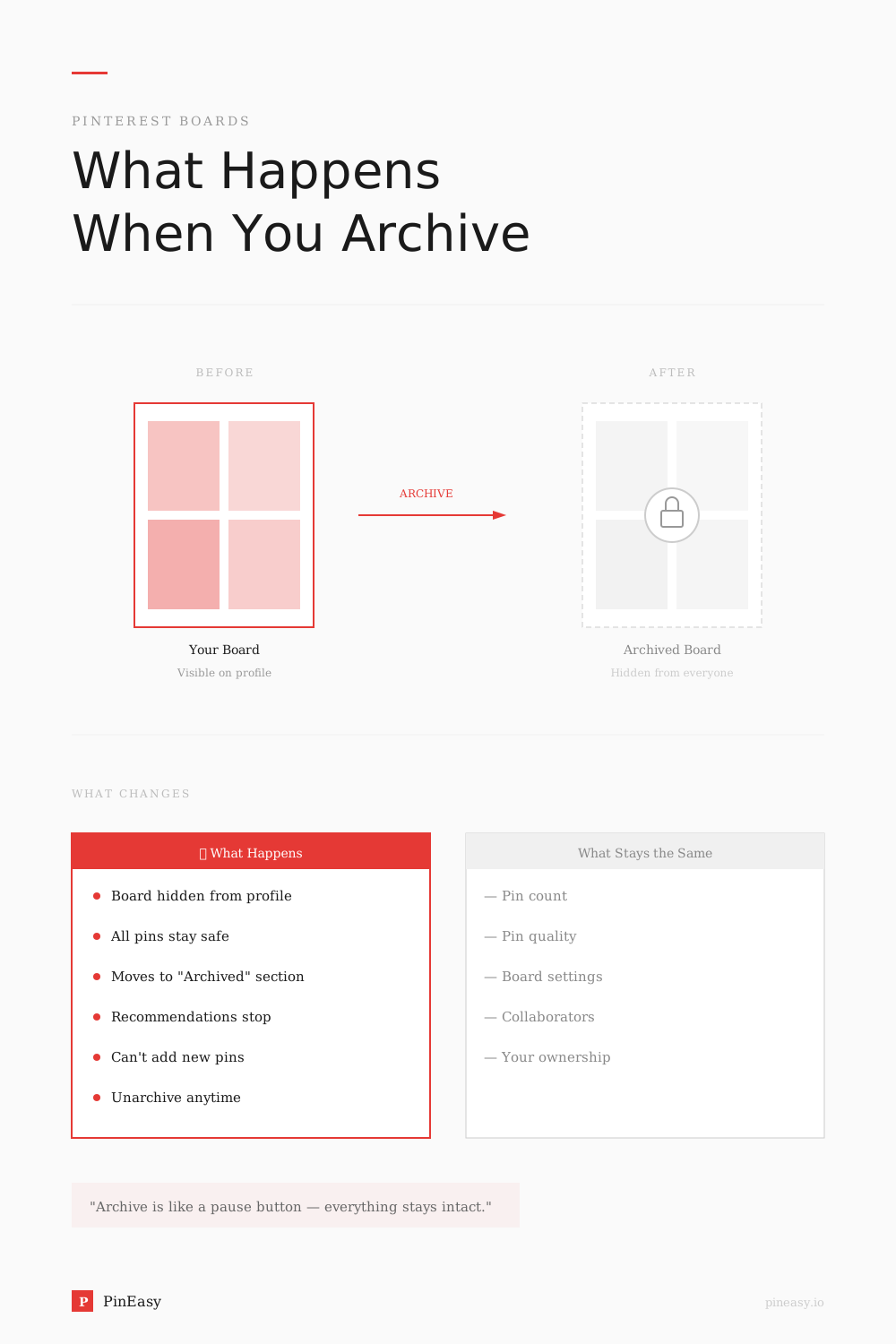
When you archive a board on Pinterest, several things happen:
- The board is hidden from your public profile. Followers and visitors to your profile won't see the archived board listed among your boards. Only you can access it.
- All your pins are preserved. Every pin you saved to that board remains intact. Nothing is deleted, moved, or altered.
- The board moves to your Archived section. At the very bottom of your profile, you'll find an "Archived boards" section where all your archived boards live.
- You can't save new pins to it. While archived, the board becomes inactive. You'll need to unarchive it first if you want to add new pins.
- Pinterest stops recommending related content. According to Pinterest's engineering team, archiving a board sends a negative signal to the recommendation system. This means you won't see as many suggestions based on that board's content in your home feed, emails, or notifications.
- You can unarchive anytime. There's no time limit on how long a board can stay archived. Restore it whenever you're ready.
When to Archive Your Pinterest Boards
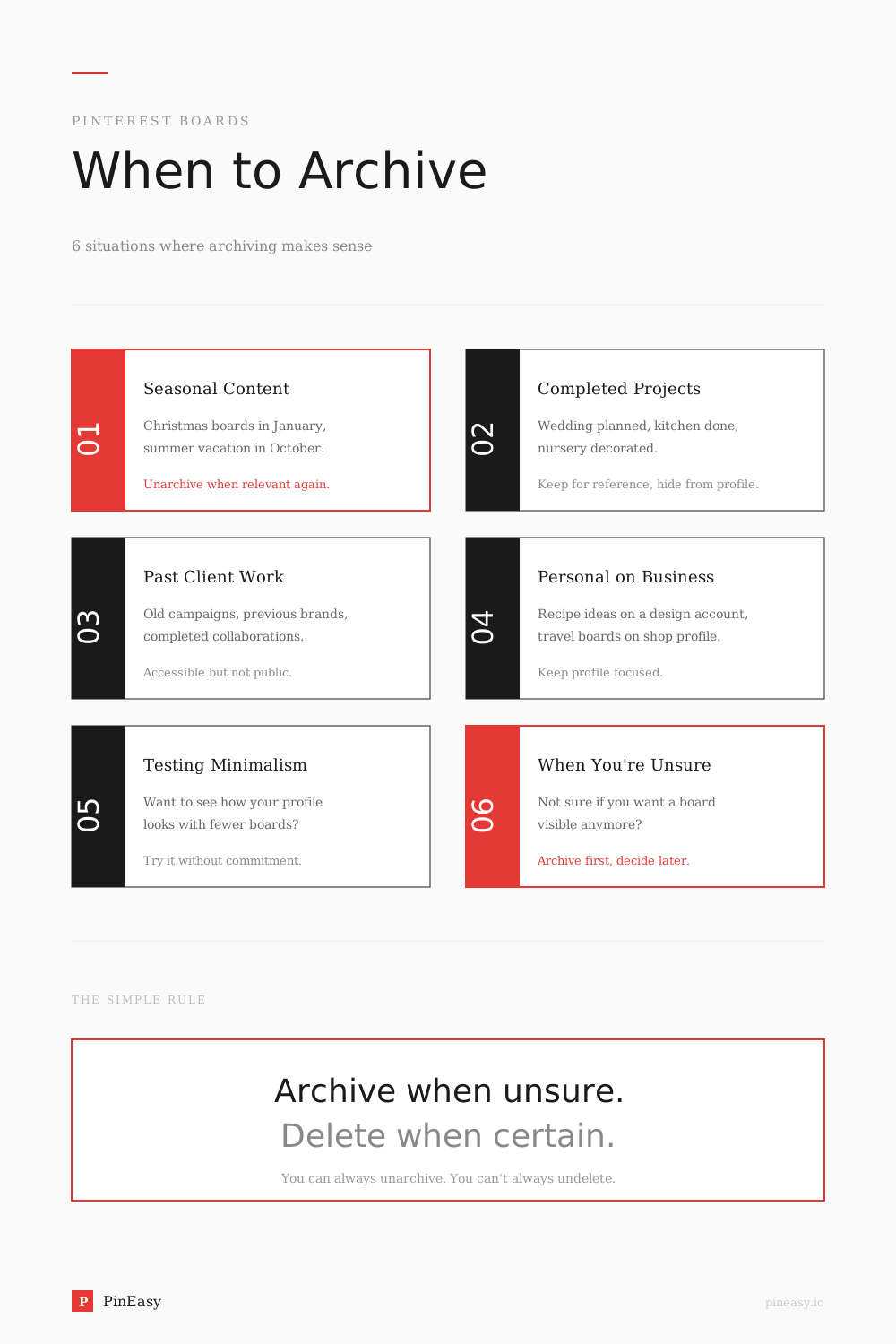
Archiving makes sense in several situations:
- Seasonal content. Christmas, Halloween, or summer vacation boards don't need to clutter your profile year-round. Archive them in the off-season and unarchive when relevant.
- Completed projects. Finished planning that wedding, nursery, or kitchen renovation? Archive the board to keep your profile tidy.
- Past client work. Business accounts often accumulate boards for past clients or campaigns. Archiving keeps them accessible for reference without appearing on your public profile.
- Personal boards on a business account. If you use Pinterest for business but have some personal boards, archiving keeps your professional profile focused.
- Testing a minimalist aesthetic. Want to see how your profile looks with fewer boards? Archive instead of delete—you can always bring them back.
- Boards you're unsure about. When in doubt, archive. You can always unarchive or delete later.
How to Archive a Board on Pinterest (Desktop)
Follow these steps to archive a board from your computer:
- Log into Pinterest at pinterest.com
- Click the dropdown arrow next to your profile picture in the top-right corner to open your profile
- Click the board you want to archive to open it
- Click the three dots (•••) next to the board name
- Select "Archive" from the dropdown menu
- Click "Archive" again to confirm
Your board will immediately move to the Archived section at the bottom of your profile.
How to Archive a Board on Pinterest (iPhone/iPad)
To archive a board on iOS devices:
- Open the Pinterest app and log into your account
- Tap your profile picture in the bottom-right corner to open your saved tab
- Tap the board you want to archive to open it
- Tap the three dots (•••) in the top-right corner of your screen
- Select "Archive board" from the menu
- Tap "Archive" to confirm
Quick tip: You can also long-press on a board from your profile to access options including archive.
How to Archive a Board on Pinterest (Android)
The process on Android is nearly identical to iOS:
- Open the Pinterest app and log into your account
- Tap your profile picture in the bottom-right corner to open your saved tab
- Tap the board you want to archive to open it
- Tap the three dots (•••) in the top-right corner of your screen
- Select "Archive board" from the menu
- Tap "Archive" to confirm
The board will move to your Archived section immediately.
Can People See Your Archived Boards on Pinterest?
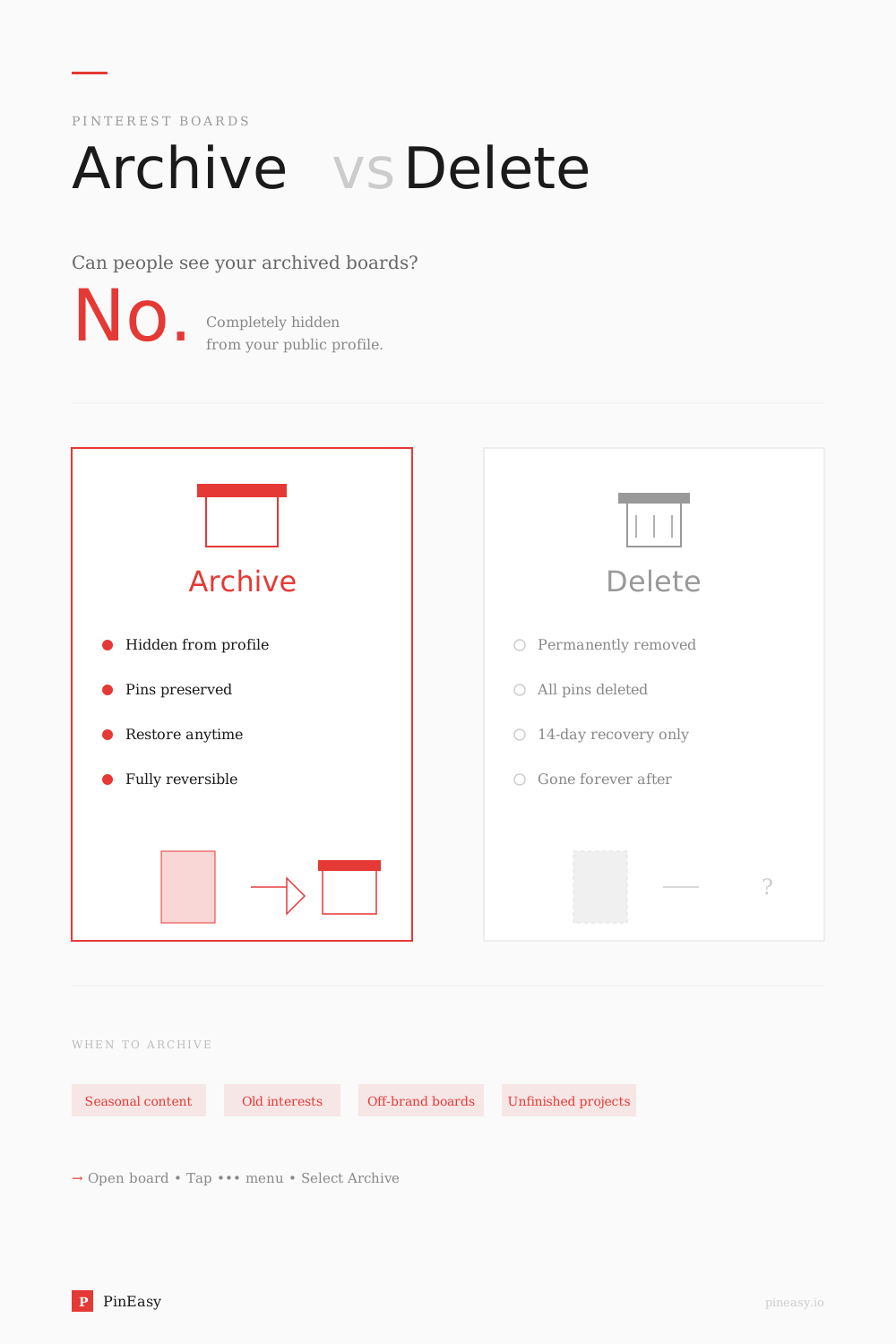
This is one of the most common questions about the Pinterest archive feature. The short answer: No, nobody can see your archived boards except you.
Here's what you need to know about archived board visibility:
- Followers cannot see archived boards. When you archive a board, it immediately disappears from your public profile.
- Profile visitors cannot see archived boards. Anyone visiting your Pinterest page won't know archived boards exist.
- Archived boards don't appear in Pinterest search. They're completely hidden from public discovery.
- Only you can access archived boards. They appear in a special "Archived" section at the bottom of your profile that only you can see when logged in.
So if you're wondering "can people see my archived boards on Pinterest?"—the answer is definitively no. Your archived Pinterest boards are 100% private.
Where to Find Archived Boards on Pinterest
Archived boards are easy to find once you know where to look:
- On desktop: Go to your profile and scroll all the way down past your regular boards. You'll see an "Archived boards" section at the very bottom.
- On mobile (iPhone and Android): Tap your profile picture, then scroll down past all your visible boards. The Archived boards section appears at the bottom.
Important: Only you can see your archived boards. They're completely hidden from your public profile, followers, and anyone who visits your Pinterest page.
How to Unarchive a Pinterest Board
Decided you want a board back on your profile? Here's how to unarchive on each device.
Unarchive on Desktop
- Go to your profile on pinterest.com
- Scroll to the bottom to find the "Archived boards" section
- Click the archived board you want to restore
- Click the three dots (•••) next to the board name
- Select "Unarchive" from the menu
- Click "Unarchive" to confirm
Unarchive on Mobile (iPhone/Android)
- Open the Pinterest app and go to your profile
- Scroll to the bottom to find the Archived section
- Tap the archived board you want to restore
- Tap the three dots (•••) in the top-right corner
- Select "Unarchive" or "Unarchive board"
- Tap "Unarchive" to confirm
Your board is now restored and visible on your profile again. You can start saving new pins to it immediately.
Archive vs. Delete: Quick Comparison
| Feature | Archive | Delete |
|---|---|---|
| Pins preserved? | Yes | No |
| Reversible? | Anytime | 7 days only |
| Hidden from profile? | Yes | Yes (removed) |
| Affects followers? | Followers can't see board | Followers lose board |
| Can add new pins? | Not until unarchived | N/A |
| Best for | Temporary hiding | Permanent removal |
Bottom line: Use archive when you're unsure. Use delete only when you're certain you'll never need that content again.
If you already deleted a board by mistake, you can recover a deleted Pinterest board within seven days.
When to Delete Instead of Archive
While archiving is the safer choice in most situations, deletion makes sense when:
- The content is completely outdated. Information that's no longer accurate or relevant might be better removed entirely.
- The board no longer represents your brand. After a significant rebrand, old boards might create confusion if they ever reappeared.
- You'll never reference those pins again. If there's zero chance you'll want that content in the future, deleting frees up mental clutter.
- You're doing a major profile cleanup. Sometimes a fresh start requires letting go of old content.
For detailed instructions on removing boards permanently, see our guide on how to delete a board on Pinterest.
Pro Tips for Pinterest Board Organization
Managing your boards effectively takes ongoing attention. Here are strategies that work:
- Audit your boards quarterly. Set a recurring reminder to review your boards. Archive or delete underperforming ones, and check if any archived boards should come back.
- Use keyword-rich board names. Clear, descriptive names help you find boards later—especially useful for archived content you might search for months down the road. Need inspiration? Check out our Pinterest board names guide for proven naming strategies.
- Archive before major launches. Cleaning up your profile before a product launch, seasonal campaign, or rebrand creates a more focused impression for new visitors.
- Consider secret boards as an alternative. Secret boards stay completely private but remain active (you can save pins to them). They're useful for personal planning on business accounts or content you're not ready to share publicly.
- Track your metrics after cleanup. Monitor your Pinterest impressions before and after archiving inactive boards. A cleaner profile often leads to better engagement on your remaining content.
- Organize with board sections. According to Pinterest's internal data, 25% of Pinterest SEO traffic goes to boards. Using sections within boards helps Pinterest understand your content better and can improve visibility.
Frequently Asked Questions
Can you archive a Pinterest board?
Yes. Archiving hides the board from your profile while preserving all your pins. You can unarchive at any time to restore the board.
Where are archived boards on Pinterest?
Archived boards appear at the very bottom of your profile in an "Archived boards" section. Only you can see this section—it's not visible to followers or profile visitors.
How do I unarchive a board on Pinterest mobile?
Go to your profile, scroll to the Archived section at the bottom, tap the board you want to restore, tap the three dots menu, select "Unarchive," then confirm.
Do archived Pinterest boards affect SEO?
Archived boards are hidden from your public profile and won't appear in search results. Pinterest also stops using them for content recommendations. However, unarchiving fully restores their visibility and functionality.
Can people see archived Pinterest boards?
No. Archived boards are completely hidden from your public profile. Followers, visitors, and other Pinterest users cannot see your archived boards—they're 100% private. Only you can view and access archived boards when logged into your account. Archived boards on Pinterest are not public and will never appear to anyone but you.
Are archived boards on Pinterest public?
No, archived boards on Pinterest are not public. When you archive a board, it becomes completely private and hidden from everyone except you. Archived boards don't appear on your profile, in search results, or anywhere else publicly visible. Only you can see and access your archived boards.
Why are my Pinterest boards not showing?
If your Pinterest boards are not showing on your profile, you may have accidentally archived them. Check the Archived section at the bottom of your profile to see if your missing boards are there. You can unarchive any board to make it visible again. Other reasons boards might not show: they're set to secret, or there's a temporary app glitch (try refreshing or reinstalling the app).
How long can I keep a board archived?
There's no time limit. Boards can stay archived indefinitely, and you can unarchive them whenever you choose.
What's the difference between archived and secret boards?
Archived boards are inactive—you can't add pins to them. Secret boards remain active and allow you to save new pins, but they're never visible on your public profile. Both are hidden from followers.
Board visibility is separate from search activity. If privacy is your concern, see who can see what you search on Pinterest.
Final Thoughts
Archiving gives you flexibility that deleting doesn't. Whether you're seasonally rotating content, cleaning up a business profile, or just tidying your Pinterest aesthetic, archiving keeps your options open.
Remember: archive when you're unsure, delete when you're certain. Your future self will thank you for having that old inspiration board available when you need it.
Ready to streamline your Pinterest workflow? Try PinEasy free and let AI help you create scroll-stopping pins automatically.
Sources
- Pinterest Help Center - Archive or Delete a Board
- Pinterest Engineering Blog - Building Board Archiving and Sorting
- Pinterest Create - The Secret to Creating Standout Boards
Related Articles
- How to Delete a Board on Pinterest — When archiving isn't enough and you need a fresh start
- Pinterest Board Names Guide — Strategic naming for better discoverability